
Abyssal Escape (Roblox) Customization
Checked October 19, 2026 (8:30 a.m. Beijing time, UTC+8). Abyssal Escape is still in Alpha, so content will change. It is an Alpha, so when the game is open may change: the Roblox page sometimes shows the game as unavailable, but 6,504 players were online at 8:38 a.m. Beijing time on October 19, 2026. That 8:30 a.m. check is October 18, 2026, at 8:30 p.m. ET and 5:30 p.m. PT. The 8:38 a.m. count is 8:38 p.m. ET and 5:38 p.m. PT on October 18. Abyssal Escape (Roblox) Customization starts from a blank vessel. There is no fixed survivor roster. Open Character Select, then Survivor Editor at the lower left. AverageX's guide, from about October 18, 2026, lists six categories: Accessories, Animations, Body Parts, Presets, Scales, and Voices. You can type a hex color. Most accessories can change color, material, size, position, and rotation, which is how his video builds a Tails-style character. The editor is still in Alpha. He says it will keep changing. On this check there is no mouth accessory and no color history. This is a Sonic.EXE fan-horror game with gore, made by fans, and it is not affiliated with SEGA.
Direct answer
- Checked October 19, 2026 (8:30 a.m. Beijing time, UTC+8). Abyssal Escape is still in Alpha, so content will change. It is an Alpha, so when the game is open may change: the Roblox page sometimes shows the game as unavailable, but 6,504 players were online at 8:38 a.m. Beijing time on October 19, 2026. Everyone gets a blank vessel. The editor is Character Select, then Survivor Editor in the lower left.
- Six categories: Accessories, Animations, Body Parts, Presets, Scales, and Voices. Colors accept a hex value. AverageX's only named hex in the Tails steps is #FFD458.
- The Tails example uses fox eyebrows, the biggest ears, a white snout, cheek whiskers made from shrunk eyelashes, three hair strands, pupils, a white square belly, white large fur, a dual fox tail, and red-and-white speedster shoes.
- There is no mouth accessory. AverageX's workaround is a halo set to the air material, colored black, scaled as small as it goes, and tucked into the muzzle.
- Tail tips on the dual fox tail cannot be recolored on their own. The editor has no color history. A custom Last Man Standing theme is not in the game.
Advertisement
Survivor Editor categories in AverageX's guide
| Category | What he shows you can do | Limit he actually states |
|---|---|---|
| Body Parts | Color the head, torso, hands, and feet. The controls he shows are a palette, a brightness bar, and a hex field. | He does not show a mouth part in this category. |
| Voices | Pick a voice pack. The pack plays when you stun the killer or use an ability. | He does not list the pack names or a Rings price. |
| Scales | Sliders for body size. | He does not print the minimum or maximum scale. |
| Animations | Walk, run, idle, and a results pose. | He does not tie a pose to a win or a loss beyond the results label. |
| Presets | Two preset accessory sets, used as a fast start. | He does not name the two presets. |
| Accessories | Listed in alphabetical order. After you pick one, Edit accessory part colors/material and Edit accessory position. Position editing covers size, position, and rotation, and it can be reset in one click. | Not every piece recolors in parts. The dual fox tail tips cannot be recolored separately. |
Gameplay reference
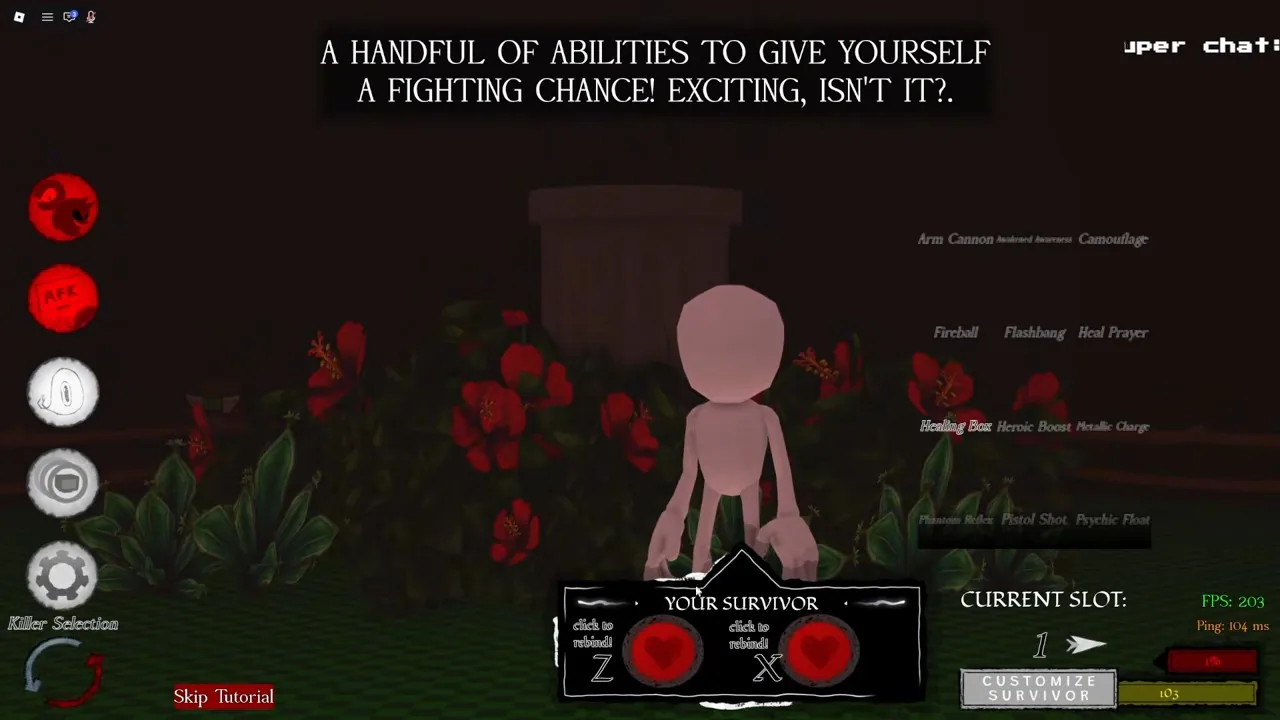
Screenshot: Galictictism on YouTube (0:42). A tutorial frame shows a blank vessel and an ability list. The subtitle reads A HANDFUL OF ABILITIES TO GIVE YOURSELF A FIGHTING CHANCE. At the bottom, YOUR SURVIVOR shows two ability slots. Checked October 19, 2026.
Galictictism · Survivor Editor · Reviewed 2026-10-19
Where the editor is, and what a vessel is
Abyssal Escape does not hand you a named survivor. Galictictism's frame at 0:42, from his video of about October 18, 2026, shows a blank vessel next to an ability list. The subtitle on that frame reads A HANDFUL OF ABILITIES TO GIVE YOURSELF A FIGHTING CHANCE, and the bottom bar reads YOUR SURVIVOR over two ability slots. The vessel is the body those slots sit on. AverageX's customization video, also from about October 18, is the source for how the editor is organized. A search on October 19 placed that upload at about one day old, and the watch page did not give an exact clock. The steps below are his Tails example, not a second creator's character and not an official SEGA model.
The click path he gives is Character Select, then Survivor Editor in the lower left. Six categories sit in that editor: Accessories, Animations, Body Parts, Presets, Scales, and Voices. The order above is the order his guide names, not a claim about the on-screen sort of the category buttons. Accessories themselves are alphabetical. The game is in Alpha, and AverageX says the editor will still change. Two gaps he names now are the lack of a mouth accessory and the lack of a color history. Do not expect an undo stack of previous swatches. If a control in a later patch is not in this list, it was not in his October video.
Color, hex, and body parts
Body Parts is where the base colors go. AverageX colors the head, the torso, and the hands and feet. The controls he uses are a palette, a brightness bar, and a field that accepts a hex code. The only hex he names in the Tails steps is #FFD458, and he puts that hex on the fox eyebrows in the Eyes list. When the later step says the body uses the same color, this page reads that as the same yellow he already chose, not as a second unpublished hex. If you want a different body color, the palette and the hex field are both on the body controls. This page does not supply a second code.
Most accessories, once selected, can change color, material, size, position, and rotation. That is the sentence that makes a Tails-style build possible out of generic pieces. The editor labels he reads are Edit accessory part colors/material and Edit accessory position. The position tool covers size, position, and rotation, and it includes a one-click reset if a piece flies off the head. Material matters later for the mouth workaround, because he sets a halo's material to air so the ring itself disappears and only the placed shape remains. Not every accessory honors a partial recolor. He singles out the dual fox tail: the tips cannot be recolored on their own.
Tails, from the eyes to the whiskers
AverageX's Tails example starts at the eyes. He picks fox eyebrows and sets the color to #FFD458. That is the yellow for the face in his build. Ears are next. He picks the biggest ears and colors the inner ear on its own. He does not name a hex for the inner ear. Separate inner-ear coloring is the fact. The swatch is yours. Snout 2 is painted white. Whiskers are not a whisker asset in his steps. He takes eyelashes, shrinks them, and moves them onto the cheeks so they read as whiskers. That move uses the position and size tools from the accessory editor.
The top of the head gets three hair strands. Pupils are a separate eye choice: he picks eyes that include pupils, rather than leaving the fox eyebrows as the only eye shape. Those two steps are still face work. Nothing in them adds a mouth. Players who stop at the eyebrows, the ears, the white snout, and the cheek lashes have his muzzle without a smile, which is why the halo step exists at the end. yezeekers posted a separate customization video. His steps are not copied onto this page. The worked example here is AverageX's Tails only.
Tails, from the body to the shoes
The body is set to the same color as the yellow already chosen for the eyebrows. Chests uses a square belly, colored white, and large fur, also white. Those two white pieces are the chest and the fluff in his build, not a second body color. Tails, the accessory, is the dual fox tail. He warns that the tips of that tail cannot be recolored separately from the rest of the tail. If you need a two-tone tail, his steps do not provide it. Leave the tips as they spawn, or pick a different tail. The shoes are speedster shoes, red and white, with the buckle recolored red. Wrists are painted white, and the cuffs at the shoe opening are painted white. That is the whole limb and footwear list he gives.
None of these piece names comes with a Rings price. The customization video does not open a shop row for fox eyebrows, dual fox tail, or speedster shoes. If a piece is locked in the live Alpha, the cost is unconfirmed, the same way ability prices are unconfirmed. Do not copy a number from a different game's cosmetic shop. The pieces above are the names AverageX clicks. A missing name means he did not use it, not that the alphabetical list is short. Accessories are alphabetical, so fox eyebrows, eyelashes, and the dual fox tail will not sit next to each other. Use the names, not the order of this paragraph, when you scroll.
Advertisement
The mouth workaround, because there is no mouth part
AverageX says the editor has no mouth accessory. His workaround is a halo. He sets the material to air, the color to black, the size to the smallest the slider allows, and he tucks that piece into the muzzle so it reads as a mouth. Air material is doing the hiding. The black color is the part you are meant to see. The one-click reset on the position tool is the way back if the halo lands on the forehead instead of the snout. This is a trick inside the tools he already described. It is not a hidden mouth category.
He also says the editor still has no color history. If you leave #FFD458, you cannot scroll back to it from a history strip. Keep the hex written down if you plan to match the eyebrows, the body, and any other yellow piece. Alpha is the reason he expects these gaps to move. A mouth asset could be added, the halo trick could break, or the air material could change. The October 19, 2026 update at 4:30 a.m. Beijing time (4:30 p.m. ET and 1:30 p.m. PT on October 18) is already later than his video. Open the editor before you assume the halo is still the only mouth.
Voices, scale, animation, and the two presets
Voices is a pack, not a typed line of dialogue. AverageX says the pack is what you hear when you stun the killer or when you use an ability. He does not name the packs, so this page does not rank them and does not connect a pack to Fleetway's voice actor. Duncachi voices Fleetway inside the game, which is a conflict of interest when his video is quoted about killers or abilities. That role is not a survivor voice pack, and his video is not the customization tutorial. Scales is a set of sliders for how large the vessel is. No numeric range is on screen in the notes, so no range is printed here. A very small or very large body is possible only to the extent the sliders move. The Tails steps do not require a scale change.
Animations cover the walk, the run, the idle, and a results pose. The results pose is the one he names for the end of a round. He does not say it changes with a win or a loss beyond that label. Presets are two accessory sets you can apply when you do not want to build from an empty vessel. He does not name the two sets. They are a fast start, not a Tails shortcut. Applying a preset and then doing the fox-ear steps is fine. Applying a preset and expecting Tails is not what the video shows. The two ability slots under YOUR SURVIVOR are not an editor category. They are the loadout, covered on the abilities page. Customization does not change Weak Punch or Healing Box.
What players do with color, and what is not live
Galictictism complains that a castle map is too dark, and he notes that some players paint the whole character black to hide in that dark. That is a report from his about-October-18 video, not a recommended camouflage lesson and not a substitute for the Camouflage ability. Painting every body part black uses the same palette and hex field as the Tails yellow. It does not require a code, and it does not change the two ability slots. If the map lighting changes in a later Alpha update, the black paint stops doing what those players wanted. His complaint is about the map, first.
A custom Last Man Standing theme is mentioned by third-party sites and by Duncachi as something that would be added later. Duncachi is the in-game voice actor of Fleetway, which is a conflict of interest. Koi Fish's October 18 video says Last Man Standing is not in the game. It was still not a live feature on the October 19 check. Do not look for a theme picker in Survivor Editor on the strength of that future line. The editor categories remain the six AverageX names. An unofficial wiki is corroboration only, and it is not a reason to add a seventh tab. The public experience is universe 10601085941. A test place with the same title is a different universe and is not where these steps were recorded.
Video evidence
AverageX: Survivor Editor and a Tails build
Uploaded about October 18, 2026. A search on October 19 showed a relative age of about one day. The watch page did not give an exact clock. m. Beijing time (UTC+8) on October 19, 2026, which is about 8:20 p.m. ET and 5:20 p.m. PT on October 18, 2026. They are search-page figures, not a YouTube analytics export. Survivor Editor walkthrough: six categories and the Tails steps, including the halo workaround where a mouth accessory is missing.
Galictictism: first-day Alpha notes
Uploaded about October 18, 2026. A search on October 19 showed a relative age of about one day. The watch page did not give an exact clock. m. Beijing time (UTC+8) on October 19, 2026, which is about 8:20 p.m. ET and 5:20 p.m. PT on October 18, 2026. They are search-page figures, not a YouTube analytics export. Says the game went live at 11:00 a.m. with no timezone, so that clock is not converted. Also the source for the starter pair Weak Punch and Healing Box, phone problems, a Healing Box pickup bug, and about 1,000 Rings in about 2 hours. The 0:42 frame shows the blank vessel and two ability slots.
Duncachi: abilities and killers, with a conflict of interest
Uploaded about October 18, 2026. A search on October 19 showed a relative age of about one day. The watch page did not give an exact clock, so no ET upload time is given. m. Beijing time (UTC+8) on October 19, 2026, which is about 8:20 p.m. ET and 5:20 p.m. PT on October 18, 2026. They are search-page figures, not a YouTube analytics export. Duncachi is the in-game voice actor of Fleetway, which is a conflict of interest. His video is a broad killer and ability tour. It is the source for Healing Box at 30 HP, Phantom Reflex at 7 seconds, and the Obsession percentages.
Sources & methodology
Official description lists Customization as a survivor feature. Read October 19, 2026. It does not list the six editor tabs. The Tails steps are from AverageX's video embedded above.
Universe 10601085941. Updated October 19, 2026, at 4:30 a.m. Beijing time, after the customization video.
Group 35012285, the creator of the public experience. Unverified, 4,512 members, owner Den_zee. Read October 19, 2026.
FAQ
How do I open character customization in Abyssal Escape?
AverageX's guide, from about October 18, 2026: Character Select, then Survivor Editor in the lower left. You start from a blank vessel, not a fixed survivor.
How many editor categories are there?
Six in his video: Accessories, Animations, Body Parts, Presets, Scales, and Voices. Accessories are alphabetical. Colors can be typed as hex. The Tails steps name #FFD458 for the fox eyebrows.
How does AverageX make a mouth?
There is no mouth accessory. He uses a halo, sets the material to air, sets the color to black, shrinks it as far as the slider goes, and places it in the muzzle. He also says the editor has no color history.
Can the fox tail tips be a different color?
Not in his steps. The dual fox tail cannot recolor its tips separately. Shoes are the speedster shoes, red and white, with the buckle recolored red, and the wrist and shoe-opening cuffs painted white.
Does customization include a Last Man Standing theme?
Not on the October 19, 2026 check. Koi Fish said on October 18 that Last Man Standing is not in the game. Duncachi, the in-game voice actor of Fleetway, said a custom theme would be added later. It is not a seventh editor tab.
Related Pages
Advertisement