
First Person Boxing (Roblox) Settings
For First Person Boxing (Roblox) settings, start with FOV 90–100 instead of the reported 80 default, enable lock-on at fight start, disable Head moves with punches and turn off knockdown replays. Tune sensitivity for steady aim. Lean is the cited body recommendation; the narrow-head tip comes from ItzVexo only.
Direct answer
- For First Person Boxing (Roblox) settings, start with FOV 90–100 instead of the reported 80 default, enable lock-on at fight start, disable Head moves with punches and turn off knockdown replays. Tune sensitivity for steady aim. Lean is the cited body recommendation; the narrow-head tip comes from ItzVexo only.
Advertisement
Suggested settings and who recommends them
| Setting | Reported default | Starting recommendation | Source |
|---|---|---|---|
| Field of view | 80° | 90–100°; compare both in practice. | AllThingsHow and Radex Tips recommend 100; ItzVexo recommends 90. |
| Glove / Look sensitivity | 1.0x | Adjust until aiming is steady. | AllThingsHow; CHALLS menu frame. |
| Lock-on at fight start | Not established here | On | AllThingsHow; ItzVexo. |
| Head moves with punches | Not established here | Off | ItzVexo only. |
| Knockdown replays | On | Off, to reduce interruptions. | AllThingsHow. |
| Control hints | On | Leave on while learning; turn off once familiar. | AllThingsHow. |
Gameplay reference
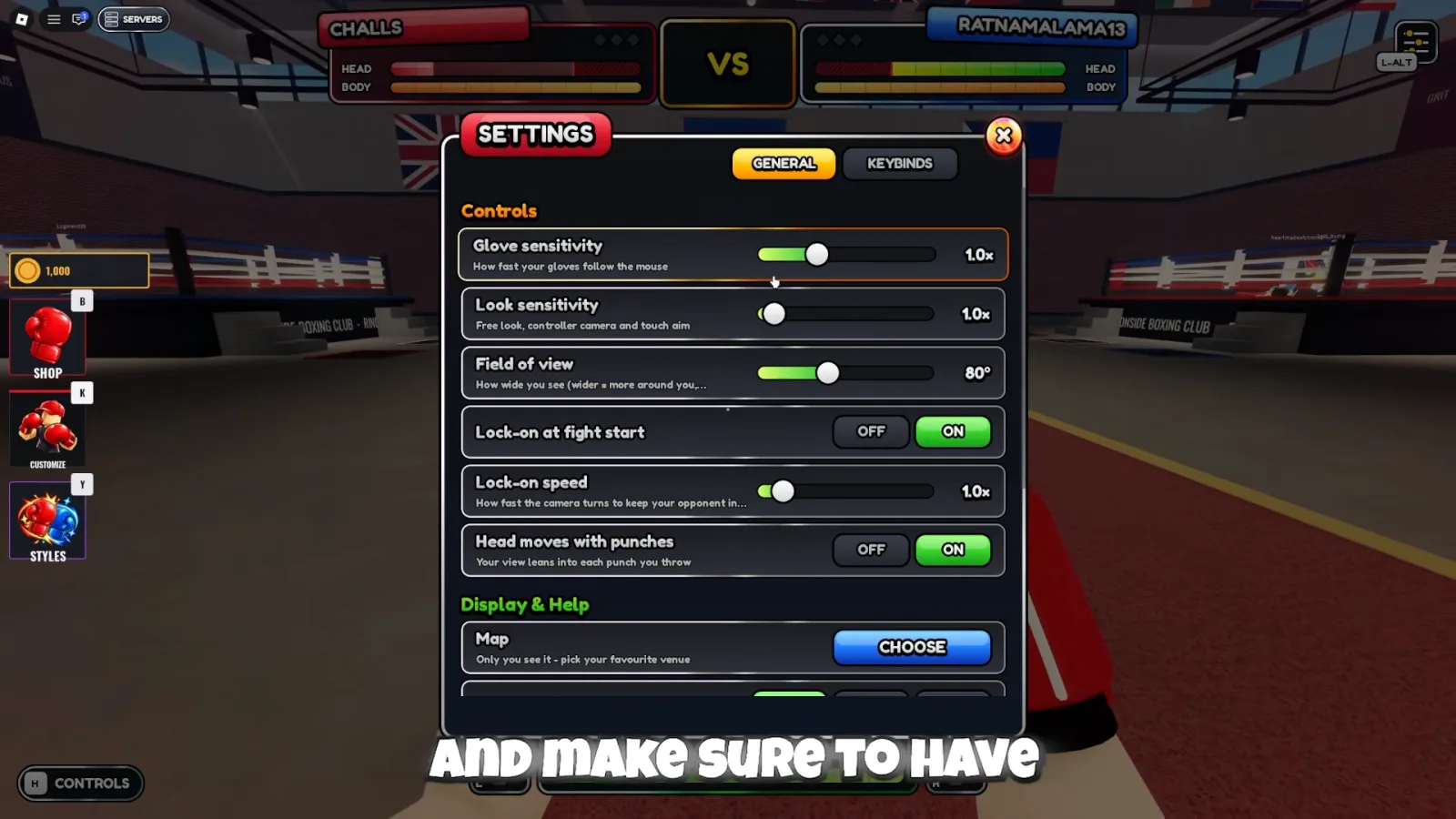
CHALLS (YouTube), published October 17, 2026, at approximately 00:40 (±3 seconds). The recorded panel identifies the settings. The recommended 90–100 range comes from the attributed guides, not a performance test on this still. Frame captured October 18, 2026.
CHALLS (YouTube) · Reviewed 2026-10-18
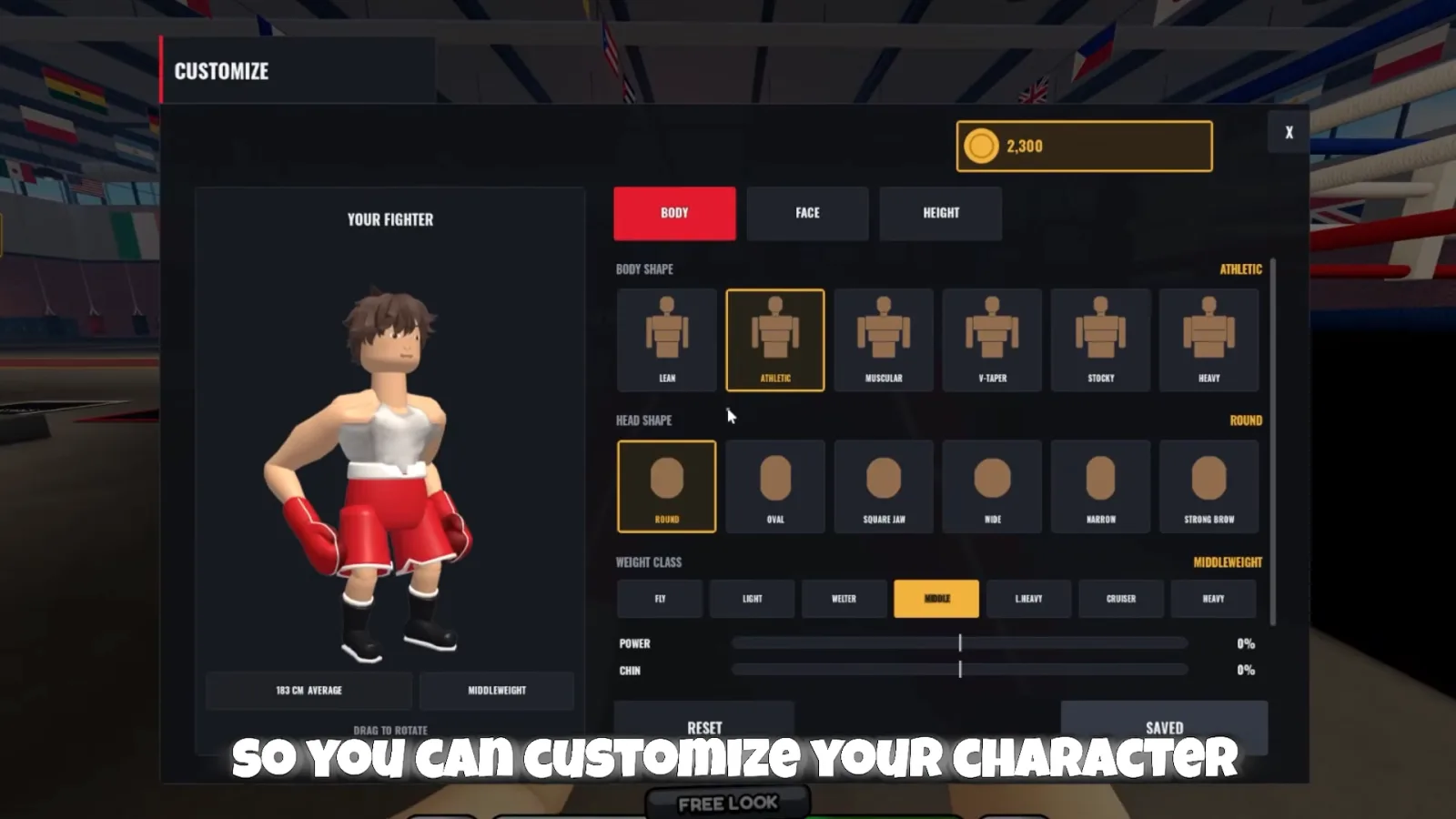
CHALLS (YouTube), published October 17, 2026, at approximately 07:22 (±3 seconds). Body choices are visible. The image does not measure hitboxes; the narrow-head target-size advice is ItzVexo’s single-source claim. Frame captured October 18, 2026.
CHALLS (YouTube) · Reviewed 2026-10-18
Open settings, then change one thing at a time
Left Alt opens Settings on PC. H opens the control chart, so keep it available while learning the punch and head-movement inputs. The CHALLS frame near 00:40 shows the Settings panel with Glove sensitivity, Look sensitivity, Field of view, Lock-on at fight start and Head moves with punches. It establishes the menu labels and the values on that recording. It is not a benchmark comparing several devices or a guarantee that every account starts with identical toggles.
Begin with FOV, then lock-on, then camera movement. Take each change into an AI practice fight and check whether you can track the next incoming punch. That order is a practical test suggestion, not an official preset. First Person Boxing supports mobile and console as well as PC. Their layouts differ, so use the current in-game prompts to reach settings rather than treating Left Alt as a device-independent instruction.
Why the recommendation is a 90–100 FOV range
AllThingsHow and Radex Tips recommend 100 FOV, while ItzVexo recommends 90. The written guide describes 80 as the default. The useful shared advice is a wider view so hooks and overhands approaching from the side are easier to notice. Start within 90–100 and compare what you can comfortably read. The evidence supports a range of preferences; it does not establish that a single value wins every fight or suits every screen.
The settings frame shows the Field of view control at 80° during the recording. That helps identify the control you need to change. It does not demonstrate a measured reaction-time improvement between 80, 90 and 100. No frame-rate benchmark, display-size formula or competitive FOV restriction appears in the reviewed sources. Avoid assigning an exact performance gain to the adjustment. The goal is to see and recognize the opponent’s next action.
Sensitivity, automatic lock-on and camera motion
Glove and Look sensitivity are reported at 1.0x by AllThingsHow and visible in the frame. Tune them until aiming is steady instead of copying an invented universal mouse value. The source review does not include DPI, a controller response curve or a touch sensitivity conversion. A practical comparison is whether you can keep the opponent in view and point a body shot deliberately without repeatedly overshooting the target.
Enable Lock-on at fight start following AllThingsHow and ItzVexo. Q is the manual lock-on input in the PC control list. ItzVexo also advises turning Head moves with punches off; this is a single-creator recommendation. The menu describes that setting as the view leaning into each punch. Disabling it is a preference for steadier viewing, not a sourced damage boost. The same recommendation should not be presented as an official competitive requirement.
Replays and control hints
AllThingsHow recommends disabling knockdown replays to avoid interrupting the flow after a knockdown. The guide reports the replay toggle as on by default. This is a presentation setting: the reviewed sources do not say turning it off changes recovery, scoring or the match result. If you prefer watching knockdowns, the evidence does not establish that leaving replays on imposes a hidden statistical penalty. The recommendation is about keeping your attention on the next exchange.
Control hints are also reported as on by default. Keep them while learning, then disable them if you no longer need the reminders. The hub contains the full PC control reference, including F or Left Shift for guard, Space + direction for head movement, and the attack keys. On another device, trust its own hints. Learning those prompts matters more than removing every overlay before you know how to defend.
Advertisement
Body, weight and height customization
Press K on PC for customization. The options and advice below come from AllThingsHow, the CHALLS menu frame and ItzVexo’s narration. Appearance options are visible, but the sources do not establish a complete hitbox or damage-stat model.
Customization choices and evidence limits
| Choice | Documented options or cost | Advice and attribution |
|---|---|---|
| Body | Lean, Athletic, Muscular, V-Taper, Stocky, Heavy | Lean is recommended by AllThingsHow and ItzVexo; larger Muscular body is described as easier to hit. |
| Weight class | Fly, Light, Welter, Middle, Light Heavy, Cruiser, Heavy | ItzVexo says heavier fighters hit harder; no numerical modifier is supplied. |
| Height | Random between 165 cm (Very Short) and 201 cm (Very Tall); reroll 750 Coins | AllThingsHow supplies range and cost. ItzVexo describes shorter as faster and taller as harder-hitting. |
| Head shape | Narrow-head option | Smaller target recommendation is ItzVexo only, a single-source claim. |
Lean is advice; head shape has only one source
AllThingsHow and ItzVexo recommend Lean on the grounds of a smaller target, while describing Muscular as larger and easier to hit. The CHALLS customization frame shows the six named body choices. It does not measure their collision volumes or prove a percentage reduction in received damage. Use Lean as the attributed starting suggestion, and judge whether it helps you read and manage exchanges rather than treating the name as a documented defense statistic.
The narrow-head recommendation is narrower evidence still: ItzVexo only. His stated reason is reducing the area an opponent can hit. No second independent source or controlled comparison in these sources confirms that effect. The caption and table therefore label it as a single-source tip. That distinction lets you try the option without mistaking one creator’s advice for a verified engine rule or a required customization for ranked play.
Height rerolls and a useful practice check
AllThingsHow gives a height range of 165–201 cm and a cost of 750 Coins per reroll. Height is random rather than directly selected. ItzVexo describes shorter fighters as faster and taller fighters as dealing more damage, without providing the numerical tradeoff. The source review gives no roll distribution or method to guarantee a particular height. Repeated spending cannot be described here as a certain route to a specific build.
Test the camera and controls you already have against AI before rerolling for an assumed advantage. Try recognizing COUNTER NOW!, responding with a straight, and returning to guard. This is a practice recommendation, not a hidden ranked eligibility test. The correct experience is universe 10768418427, place 132956556682909, by Can You Box?. It is NOT Untitled Boxing Game / Boxing Beta / Untitled Robot Boxing, and settings or build claims for those games are not carried into this page.
Video evidence
Radex Tips — beginner settings and combat
Radex Tips. Published 2026-10-17. Recommends FOV 100 and explains beginner controls.
ItzVexo — codes, styles and controls
ItzVexo. Published 2026-10-17. Recommends FOV 90, automatic lock-on, disabling Head moves with punches, Lean and a narrow head. The narrow-head tip is single-source.
Sources & methodology
Settings source check
FOV, replay and customization figures follow the attributed October 17 guides. CHALLS supplies the actual Settings and Customize menu frames. ItzVexo’s Head moves with punches and narrow-head recommendations remain single-source advice. No hitbox percentage, height distribution, DPI conversion or device benchmark is inferred.
The settings page uses the sources accessed on 2026-10-18 (UTC+8). Its Roblox stats snapshot is 2026-10-18 11:45 UTC+8; codes were checked at 2026-10-18 12:30 UTC+8; Roblox API prices were checked at 2026-10-18 12:03 UTC+8. These are dated records, not continuously updated values. The selected videos are the identity-checked uploads in that review. Official artwork belongs to Can You Box? and gameplay frames are credited to CHALLS (YouTube).
Source links
Official PC, mobile and console support; practice against AI or human opponents. Accessed 2026-10-18 (UTC+8).
Published October 17, 2026. FOV default and recommendation, sensitivity, replays, body choices, height range and 750-Coin reroll. Its article draws on CHALLS, so those two are not independent confirmation. Accessed 2026-10-18 (UTC+8).
Related Pages
Advertisement