
Enshrouded 1.0 Old Saves: Missing Character or World Fix
Checked October 22, 2026 (UTC+8) against game version 1.0.0.3. What Enshrouded 1.0 does to an Early Access save, how to find a character or world that seems to be gone, where 1.0 keeps its save files, and what the October hotfixes changed for save migration.
Direct answer
- Enshrouded 1.0 does not delete Early Access characters or worlds: the first time it loads a save from version 0.8 or earlier, it backs the old files up and converts them to a new format. If something looks missing, switch between the Savegames: Local and Savegames: Steam tabs, then update to Hotfix 1.0.0.3 (October 21, 2026), which fixed more migration failures. Keen has not said that every character skipped as corrupted in Hotfix 1.0.0.2 is restored yet, so keep all save folders untouched and contact Keen support if it is still gone.
Advertisement
Quick checks — Enshrouded 1.0.0.3, checked October 22, 2026
| If you see this | What it means | What to do |
|---|---|---|
| Character or world list looks empty | 1.0 shows local saves and Steam Cloud saves on separate tabs | Open the other tab: Savegames: Local or Savegames: Steam |
| Skill points are unspent | The skill tree resets the first time 1.0 loads an existing save | Spend the points again (our tip: do it before leaving your base) |
| Old character still missing on both tabs | Hotfix 1.0.0.2 skips corrupted characters instead of crashing | Update to 1.0.0.3, keep every save folder, contact Keen support |
| Warning that save data cannot be overwritten | Windows has the save data set to read-only | Clear the read-only attribute on the save folder, then relaunch |
| Base water is gone after updating | 1.0.0.3 repairs a misplaced Flame Altar during migration, but that base's water cannot be loaded | Re-add the water by hand |
Gameplay reference
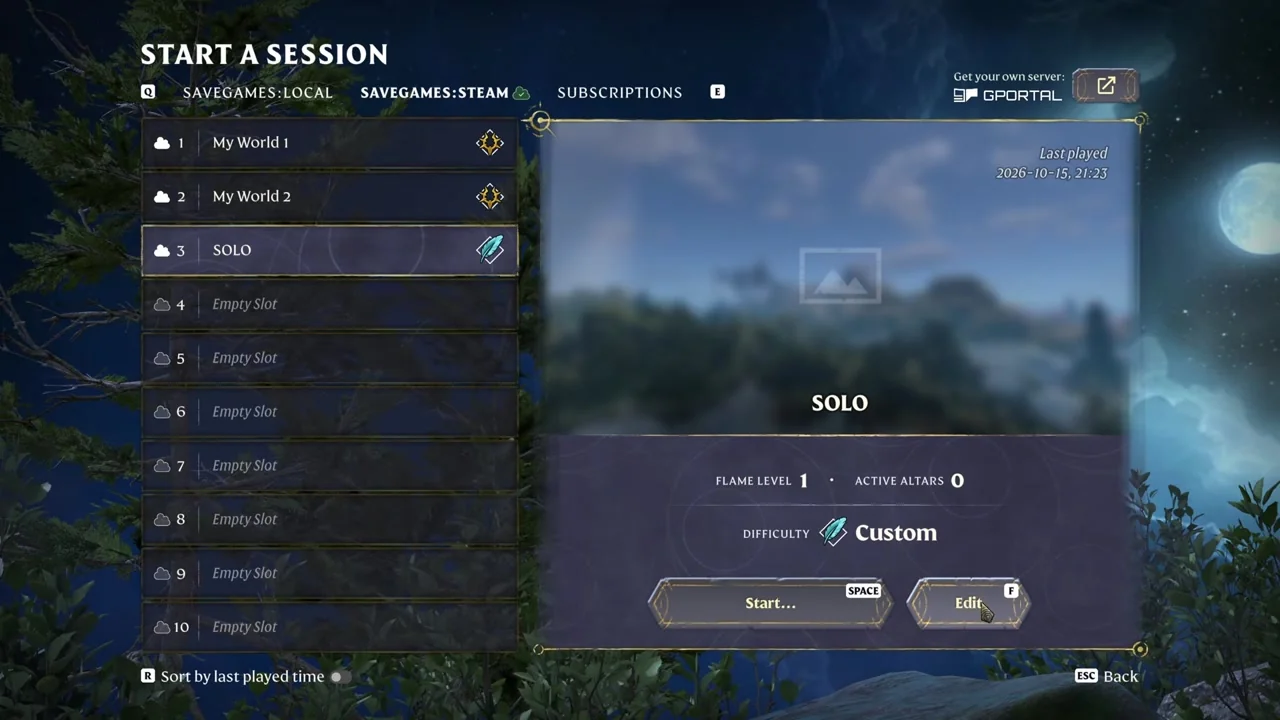
Jonnny Five (YouTube), uploaded October 16, 2026, at 0:12. The Start a Session screen in 1.0 splits worlds into Savegames: Local and Savegames: Steam.
Jonnny Five (YouTube) · Reviewed 2026-10-22
What Enshrouded 1.0 does to an Early Access save
- Check: PC owners of the Early Access version do not need to buy the game again (Keen launch FAQ, October 14, 2026).
- Check: When 1.0 first finds a save created with version 0.8 or earlier, it backs that save up and then migrates it to the new, smaller save format automatically (1.0 changelog).
- Check: Character selection and world selection now have separate tabs for the local save folder and the Steam Cloud folder. A save on one tab does not show on the other.
- Check: The skill tree is reset the first time you play 1.0 with an existing save. Keen's 1.0 changelog says: "Please make sure to spend the skill points again!" Our own suggestion is to spend them before you leave your base.
- Check: Keen still recommends starting a new world because the opening hours were reworked, but old saves remain playable.
Step by step: find a character or world that seems to be missing
1. Close the game and copy both save folders (listed in the next section) to another drive or folder. Keen's support team recommends a copy of all save files before any change.
2. Let Steam install the latest update. As of October 22, 2026 that is Hotfix 1.0.0.3, version 1273043.
3. Launch the game and check the character list on both tabs. Then open Play, Start a Session and check both Savegames: Local and Savegames: Steam.
4. If the game warns that save data cannot be overwritten, the save files are set to read-only in Windows. Remove the read-only attribute in the folder's Properties and start the game again.
5. If the character is on neither tab, do not delete, rename or overwrite anything. Send Keen support your game version, the tab you expected it on and when you last played it before 1.0.
Where Enshrouded 1.0 keeps your saves
Keen's own Save Game Management article was last edited on April 23, 2026 and still describes the Early Access layout, with world files named like 3ad85aea and ten rolling copies per world. Those names do not match 1.0 saves, so do not use that layout to restore a 1.0 world.
Save locations in version 1.0 (Windows, Steam)
| What | Location or file | Source |
|---|---|---|
| Local saves (Savegames: Local) | C:\Users\<your Windows user>\Saved Games\keen games\Enshrouded\default | Keen 1.0 changelog; DatHost; Supercraft |
| Steam Cloud saves (Savegames: Steam) | C:\Program Files (x86)\Steam\userdata\<your Steam ID>\1203620\remote | Keen support article; DatHost; Supercraft |
| World files | One file per slot: slot 1 is world0.ksd, slot 2 is world1.ksd, up to world9.ksd for slot 10 | DatHost; Supercraft |
| Dedicated server world | savegame/world0.ksd next to the server executable, with rolling copies in savegame/backup | DatHost; Supercraft |
| Converted Early Access files on a server | savegame/migrated (the 1.0 server no longer reads this folder) | DatHost; Supercraft |
| Converted Early Access files on your PC | Unconfirmed (Steam Community players, October 15–18, 2026): a migrated folder inside Saved Games\Enshrouded | Steam Community |
Advertisement
Hotfixes that changed save migration
Enshrouded 1.0 hotfixes, October 2026 (dates in UTC+8)
| Hotfix | Date | What it changed for old saves |
|---|---|---|
| 1.0.0.1 (version 1267041) | October 16, 2026 | The Edit button for worlds could stop working; Keen's workaround was to subscribe to any Adventure Sharing entry, then edit the world again |
| 1.0.0.2 (version 1269579) | October 16, 2026 | World settings can be configured again; corrupted character saves are skipped instead of crashing the migration, with a repair fix still in progress |
| 1.0.0.3 (version 1273043) | October 21, 2026 | Fixed a rare migration crash; characters with invalid entries in additional backpack slots now migrate without those items; a Flame Altar outside the voxel grid is moved back, but that base's water must be re-added; fixed an endless black screen when loading a multiplayer game |
Keep your old world or start a new one?
Both work. Keen's launch FAQ strongly encourages starting over, and the changelog reworked the early game with more chests, clearer roads and cheaper early recipes.
You can also take an existing character into a new world. According to Keen's FAQ, a character moved to another world keeps its equipment, inventory, levels and unlocked skills, map memory, personal crafting recipes, collected Shroud Roots, found lore and tutorials, and towers it found itself. It does not keep most crafting recipes or rescued survivors, which belong to the world. Unconfirmed (Keen support FAQ, last edited January 21, 2026): this list was written before 1.0.
What not to rely on
- Check: Manual re-migration: Keen has published no method for converting an old backup again. Unconfirmed (Steam Community players, October 18–22, 2026): one player got 1.0 to re-convert old files by swapping folders, another reported that the same steps failed.
- Check: Old file-renaming guides written for Early Access world names. 1.0 uses world0.ksd to world9.ksd.
- Check: Deleting the backup or migrated folders to free space before your migrated worlds and characters load correctly.
Video evidence
Jonnny Five — Start a Session tabs in 1.0
Jonnny Five (YouTube), uploaded October 16, 2026. At 0:12 the Start a Session screen shows the Savegames: Local and Savegames: Steam tabs.
Jonnny Five (YouTube): How to FIX Editing World Settings in Enshrouded 1.0
Jonnny Five (YouTube), uploaded October 16, 2026: frame at 0:12 showing the Start a Session tabs.
Sources & methodology
Keen Games, published October 14, 2026: save data section (backup and migration, Local/Steam tabs, read-only warning, new folder) and skill tree reset.
Keen Games, published October 16, 2026: corrupted characters are not migrated; repair fix in progress.
Keen Games, published October 21, 2026: migration crash, backpack slot and Flame Altar fixes.
Keen Games, published October 16, 2026: Edit world button workaround.
Keen Games, published October 14, 2026: Early Access saves usable, no rebuy on PC, recommendation to start over.
Keen Games, published September 23, 2026: skill tree reset warning.
Keen support article, last edited April 23, 2026: Steam Cloud folder and backup advice; describes the pre-1.0 layout.
Keen support FAQ question 19, last edited January 21, 2026: what a character keeps in another world.
Keen support contact form linked from the Hotfix 1.0.0.2 notes.
DatHost Help Center, updated October 15, 2026: 1.0 tabs, folders and world0.ksd to world9.ksd slots.
Supercraft, updated October 21, 2026: 1.0 server world file, backup and migrated folders.
TheClick.gg, updated October 20, 2026: independent report of the tabs, folder and Hotfix 1.0.0.2 behaviour.
Steam Community thread, posted October 18, 2026: 1.0 file names and mixed re-migration reports.
Steam Community thread, posted October 16, 2026: contents of the migrated folder.
FAQ
Will Enshrouded 1.0 wipe my Early Access save?
No. Keen says Early Access saves work in 1.0. The game backs them up and converts them the first time they load. The skill tree is reset, so spend your points again.
Why are all my skill points unspent after the update?
Keen reset the skill tree for existing saves because skills were added and moved in 1.0, and its 1.0 changelog asks you to spend the skill points again. Our own tip: do that before you leave your base.
If I take my old character into a new world, what do I keep?
Per Keen's FAQ (written before 1.0): equipment, inventory, levels and unlocked skills, map memory, personal recipes and collected Shroud Roots. World-bound progress such as most crafting recipes and rescued survivors stays with the old world.
My base lost its water after the update. Is it a bug?
Hotfix 1.0.0.3 says that when a Flame Altar sat outside the voxel grid, migration now moves it back, but that base's water cannot be loaded and has to be re-added.
Can I restore a backup I made before 1.0?
Keep it, but there is no official way to convert it again. Player reports are mixed, so contact Keen support before overwriting anything.
Related Pages
Advertisement